For iPhone and Android

The quick, simple way to make PDF photo reports.

OpusActa turns the photos on your phone into a clear PDF report: snags, damage, condition checks, hazards, progress, handovers, anything that needs a photo and a comment. No account, no training, no subscription.

Free to download, every feature included. Make as many reports as you like; your first 5 shares are free. Then one payment of £16.99 (shown in your own currency in the store) for unlimited sharing. No subscription.

  • No account
  • Works without signal
  • iPhone and Android
  • Your reports stay on your phone
Photo 1: bricklayer laying a brick to a string line Bricklayer laying a brick to a string line
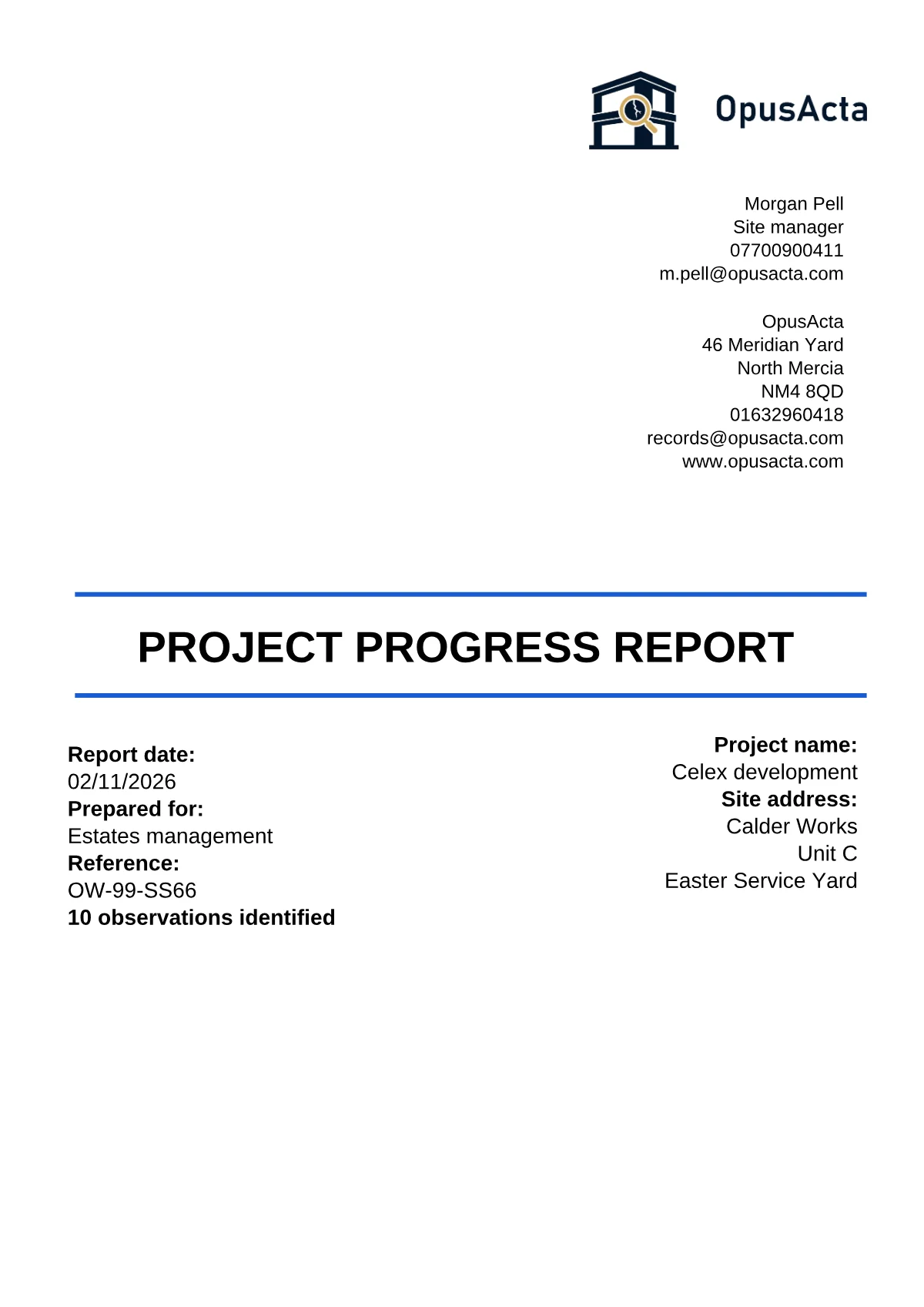
OpusActa Letterhead cover of a project progress report
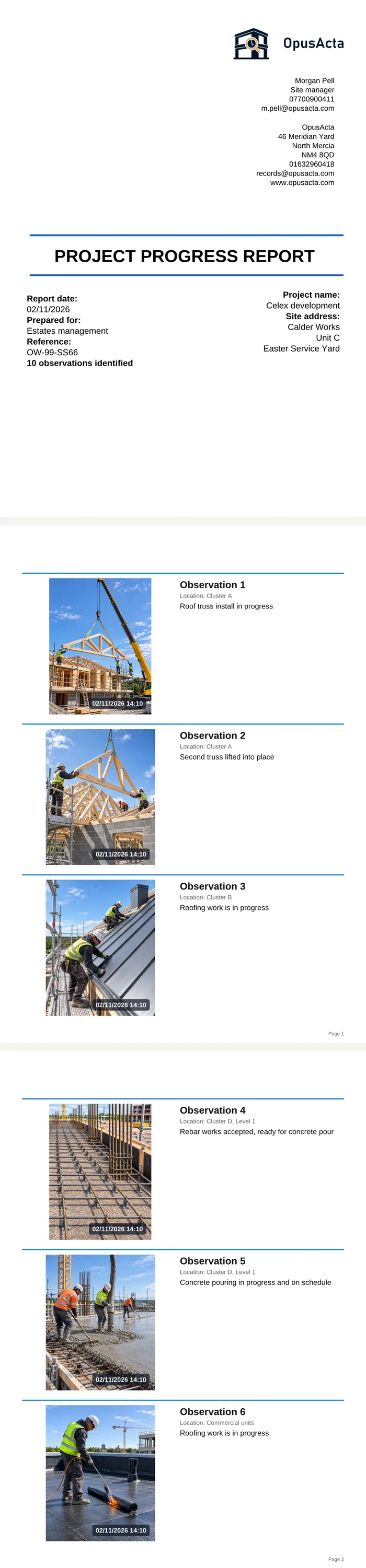
OpusActa Report Overview showing six observations of a progress report

Made for any job that needs a photo and a comment

If your work needs a photo with a comment next to it, OpusActa is for you. On site, in a hotel, in a workshop, in a rented flat. Call your items whatever your work calls them: Issue, Observation, Hazard, Damage, or your own word.

  • Telehandler delivering a pallet of blocks on a building site
    Trades & construction
  • Water stain on a ceiling beside an open access hatch
    Property & landlords
  • Stain on a hotel bedroom carpet
    Hotels & facilities
  • Scratched car bodywork being photographed in a workshop
    Vehicles & workshops
  • Leaking waste pipe under a basin, engineer checking with a torch
    Service & installs
  • Loose electrical socket beside a bed
    Home & personal
  • Snagging
  • Site observations
  • Hazard reports
  • Progress photos
  • Handovers
  • Maintenance checks
  • QA records
  • Condition reports
  • Damage records
  • Inventories

Why the name? Opus is Latin for work, acta for records. OpusActa: your work, on record. Whatever the work is.

Three steps, nothing to learn

Set up once: your name, company and logo, and the cover page you want. They print on every report from then on.

  1. Name the report.

    Give it a title and the job details: project, site, who it is for. Details you have used before are one tap away in the history list.

  2. Add photos and notes.

    Take photos in the app or pick them from your gallery; you can even share photos into OpusActa when the app is closed. Give each one a title and a comment, and mark it up.

  3. Preview and share.

    The overview shows the report exactly as it will print. Tap Share and send the PDF by WhatsApp, email or any app.

Why people switch to OpusActa

Layout sheet with 2 by 3 items per page selected Report Overview at 2 by 3 Layout sheet with 1 by 3 items per page selected Report Overview at 1 by 3 Cover Page screen, Letterhead template, showing this report's data Report Overview showing the Letterhead cover

See the report before you make it

The Report Overview shows your cover and every photo item laid out as they will print. Change the layout or the style and watch it update, before you generate a single PDF.

  • Choose how many photos go on a page: 2 to 10
  • Pick the cover design and the icon style and see the result straight away
  • What you see in the overview is what comes out in the PDF
Report Overview with four observations on one page Actions sheet with Share items Three items selected, ready to share The shared item card opened full screen on another phone Item Detail with the photo, title, comment and Assigned to field Recent comments list, one tap to reuse a previous comment

Fast on site

Built for a phone in a gloved hand, not a desk.

  • Share one item or a few straight to WhatsApp, email or any app, without making the whole report
  • Add photos from your gallery, or share them into OpusActa from the gallery even when the app is closed
  • Reuse titles and comments from your previous reports with one tap: the clock button keeps your history
Company Logo screen with a logo set Markup screen with an arrow and a text label drawn on a photo Choose Destination Report confirming three items moved Report Overview with a date and time stamp on each photo

Your report, your way

Make it look like your company's report, not ours.

  • Three cover designs, each with presets; rearrange the blocks and fields as you like
  • Your logo, your colours, your company details on every cover
  • Rename the fields to suit the job: Project name, Location, Prepared for, Assigned to, or anything else
  • Draw on photos: pen, arrow, dimension line, line, box and text label; your marks stay editable later
  • Move or copy items to another report, so one site visit can feed several reports
  • Date and time stamp on every photo, if you want it
New Report screen with its help sheet open Report Overview screen with the Add Photos help sheet open Report Overview screen with its help sheet open

Nothing to learn

Open the app and start. Every screen explains itself.

  • A short welcome tells you what to do first
  • Every screen has an "i" button with a few lines of help
  • Three steps from photo to PDF, no projects or folders to set up
  • Same app, same features on iPhone and Android

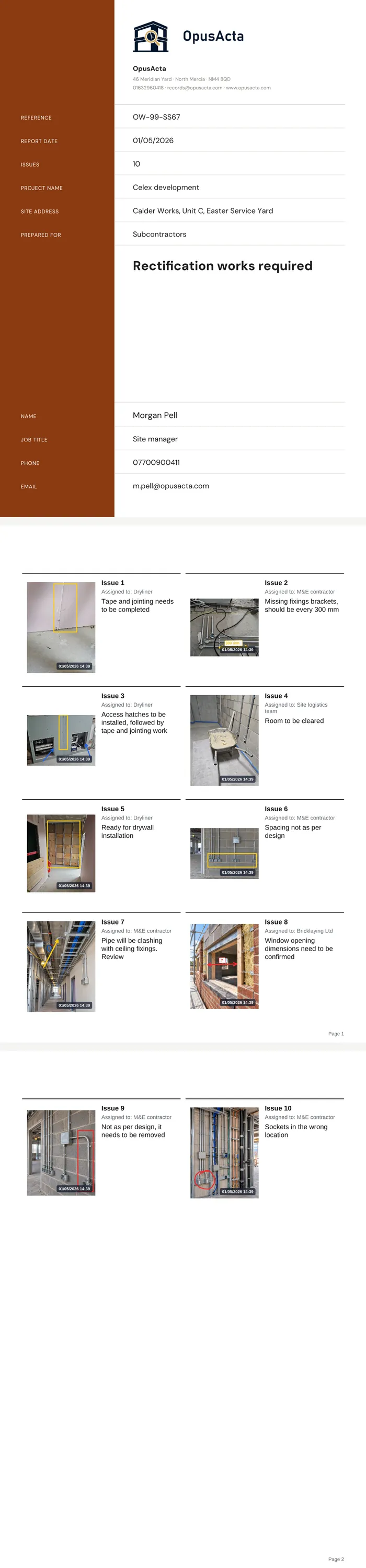
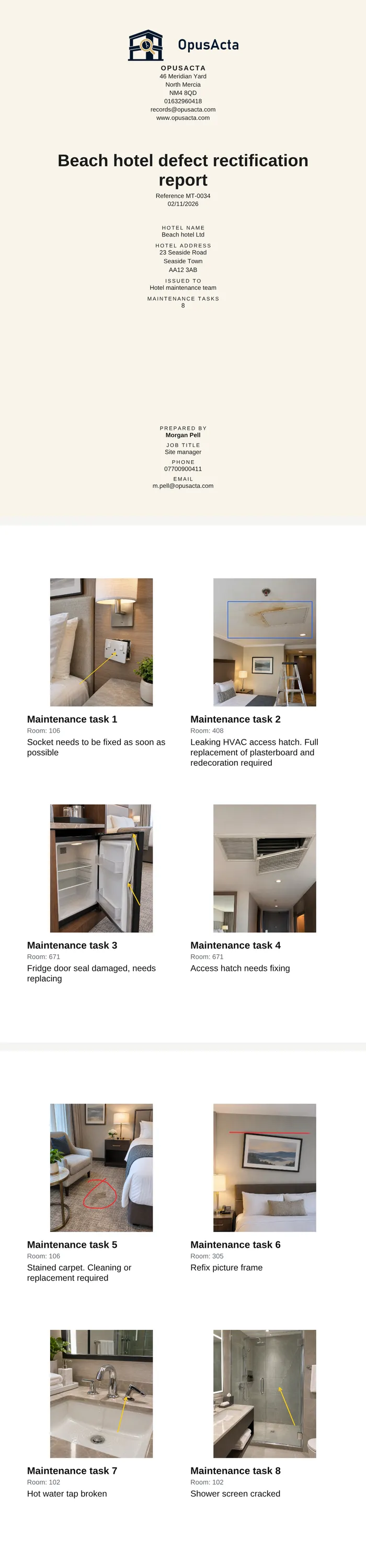
Three sample reports. Three different jobs.

Every report is built from the same parts: your cover, your details on every page, and photo pages in the layout you choose. Here are three, each a different job, cover and layout. Open them on your phone or print them.

One price. Pay once.

  • Free to download

    Every feature included from the first day. No account, no card details.

  • Your first 5 shares are free

    Make as many reports as you want and preview them all. Sharing a report PDF, or a batch of item cards, counts as one share. The first five are on us.

  • Then £16.99, once

    Unlimited sharing, every design, every update. No subscription, no monthly fee. The store shows the price in your own currency.

The full version is bought in the store on your phone and tied to that store account, so an iPhone and an Android phone each need their own purchase. A new phone signed in to the same store account restores it free.

Your reports stay on your phone

OpusActa has no account and no servers. Your reports and photos are stored on your phone and go only where you send them. The app connects to the internet for two things only: to check for app updates, and when you share a report or a photo through another app. We never see your reports.

Changing phones? Backup saves everything to a file you keep. Restore it on the new phone and carry on.

Questions

How much does it cost?

Free to download with every feature included. You can make and preview as many reports as you like; what the free version limits is sharing. Sending a report PDF or a batch of item cards to another app counts as one share, and the first five are free. After that, one payment of £16.99 (the store shows it in your own currency) gives you unlimited sharing. No subscription, nothing else to buy.

Do I need an account or an internet connection?

No account, ever. The app works fully without signal. You only need a connection to share a report or to receive app updates.

Where are my photos and reports kept? Can you see them?

On your phone only. OpusActa has no servers and no account, so there is nothing for us to see.

What happens if I lose or change my phone?

Use Backup in Setup to save everything to a file: your reports, photos, settings and logo. Keep that file anywhere you like, such as your cloud drive or email, and make a fresh one regularly. You can restore from it at any time, on this phone or a new one.

Does one purchase work on both my iPhone and my Android phone?

The full version is bought in the store on your phone and tied to that store account, so an iPhone and an Android phone each need their own purchase. Your reports move between them with Backup and Restore.

Can I put my company name and logo on the reports?

Yes. Enter them once in Setup and they print on every cover. You can also rename the fields on the cover and the item pages to suit your work.

How do I send a report?

Tap Share on the Report Overview and send the PDF by WhatsApp, email, Teams or any app on your phone.

Can I share single items without making the whole report?

Yes. Select one or more items in the report and tap Share items. They go straight to WhatsApp, email or any app on your phone.

Can I add photos straight from my gallery?

Yes. Pick them in the app, or share them from your gallery into OpusActa, even when the app is closed. OpusActa then asks whether to add them to an existing report or start a new one.

Can I move or copy items from one report to another?

Yes. In the report, select the items, open the Actions menu and choose Move or Copy, then pick the report they go to.

Do I have to fill in every field?

No. Leave out anything you do not need. Empty fields are never printed, and the cover page rearranges itself so the layout stays balanced.

Is there a limit on how much I can type?

Yes, on the cover fields and on photo comments. The limits keep the cover page balanced and the photo pages readable. The app shows you how much room is left as you type.

Does the app remember what I typed before?

Yes. Report details and photo titles and comments keep a history of what you have entered. Tap the clock and pick a previous title, comment or project name instead of typing it again. A real time saver on repeat visits and busy days.

Can I get a refund?

Purchases are handled by Apple and Google. Refunds follow their rules: on iPhone through reportaproblem.apple.com, on Android through Google Play.

Worker on a building site photographing copper pipework with a phone

Your next report, done on site

Download OpusActa, set up your details in a minute, and make your first report today. Your first 5 shares are free.

Coming soon to the App Store and Google Play.